Best Webcam for OnlyFans (2026): Every Budget, Tested Picks
The short answer: for most OnlyFans creators the best webcam in 2026 is the Elgato Facecam MK.2 — $139.99 on Elgato’s own store as of July 2026, with a Sony STARVIS sensor that holds up in dim bedroom light and uncompressed 1080p60 over USB 3.0. On a tight budget, the Logitech C920s at $69.99 (Logitech store, July 2026) is still the plug-and-play default it has been for a decade. And if you move while you stream, the Insta360 Link 2 at $199.99 tracks you on a gimbal so you never leave frame.
That is the funnel. Below: which tier you actually need, why low light matters more in this niche than any spec sheet admits, and where a webcam stops being enough — past a certain revenue point the right upgrade is a mirrorless camera, not a fourth webcam.
Some links below are affiliate links: if you buy through them we may earn a commission at no extra cost to you. It never changes which cameras we recommend, and every price here was read on the vendor’s own page or in the cited review on the date stated.
The 2026 shortlist at a glance
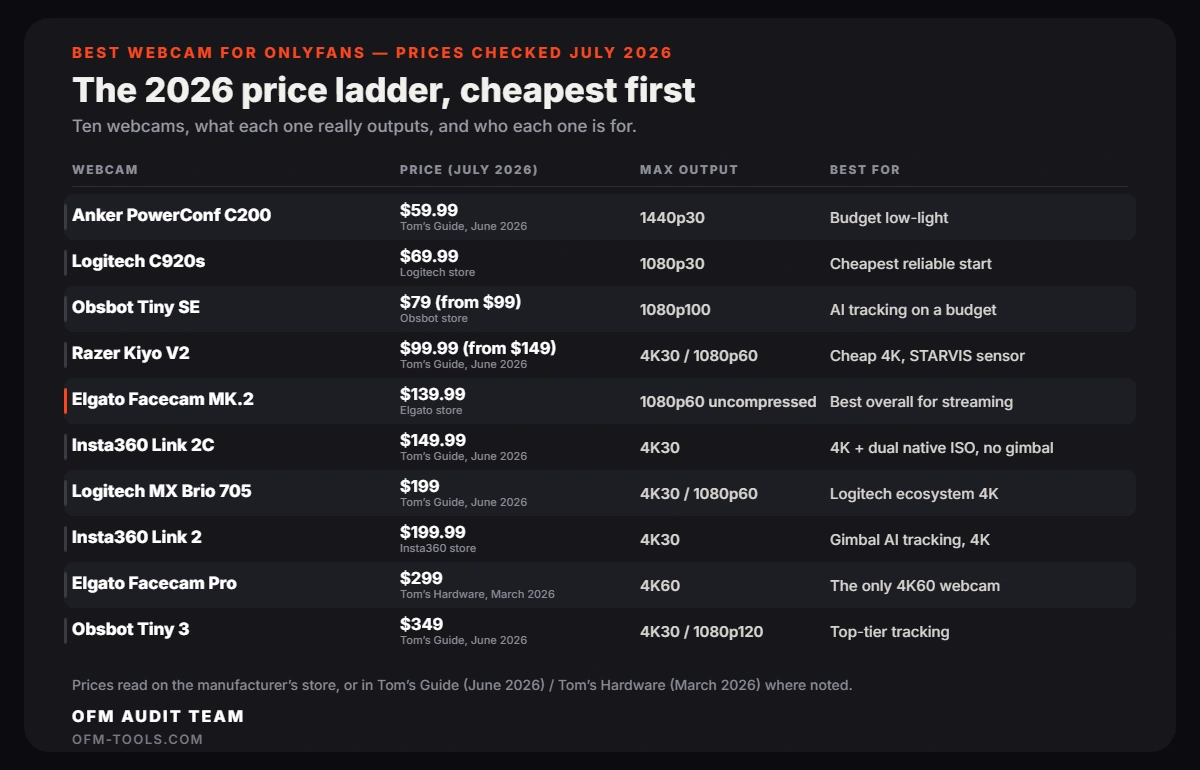
Every price below was checked in July 2026, either directly on the manufacturer’s store or in Tom’s Guide’s June 2026 webcam roundup (their lab tests every unit; we cite their pricing where we could not verify the vendor page ourselves).
| Webcam | Price (checked July 2026) | Max output | Best for |
|---|---|---|---|
| Logitech C920s | $69.99 — Logitech store | 1080p30 | Cheapest reliable start, privacy shutter |
| Obsbot Tiny SE | $79 (from $99) — Obsbot store | 1080p100 | AI tracking on a budget |
| Anker PowerConf C200 | $59.99 — Tom’s Guide, June 2026 | 1440p30 | Budget low-light |
| Razer Kiyo V2 | $99.99 (from $149) — Tom’s Guide, June 2026 | 4K30 / 1080p60 | Cheap 4K, STARVIS sensor |
| Elgato Facecam MK.2 | $139.99 — Elgato store | 1080p60 uncompressed | Best overall for streaming |
| Insta360 Link 2C | $149.99 — Tom’s Guide, June 2026 | 4K30 | 4K + dual native ISO, no gimbal |
| Insta360 Link 2 | $199.99 — Insta360 store | 4K30 | Gimbal AI tracking, 4K |
| Logitech MX Brio 705 | $199 — Tom’s Guide, June 2026 | 4K30 / 1080p60 | Logitech ecosystem 4K |
| Elgato Facecam Pro | $299 — Tom’s Hardware, March 2026 | 4K60 | The only 4K60 webcam |
| Obsbot Tiny 3 | $349 — Tom’s Guide, June 2026 | 4K30 / 1080p120 | Top-tier tracking |
Why a webcam at all — and when it is the wrong buy
A webcam earns its place in two jobs: live streaming (OnlyFans Live, cam sessions, fan video calls) and desk-length content shot within a meter of the lens. It is plug-and-play, needs no battery or capture card, and runs six-hour sessions without overheating — none of which is true of a mirrorless pressed into webcam duty.
What it will not do is shoot your PPV library: the sensors are smaller than a phone’s, so full-body shots, real bokeh and premium customs are out of reach. If recorded content drives your revenue, spend on the camera tier and keep a $70 webcam for lives. If lives and calls are where your fans spend, this list is your list.
Under $100: the budget tier that actually works
Logitech C920s — $69.99, the default
The C920s has survived a decade of “webcam killers” by doing the boring things right: reliable autofocus, accurate skin tones, a physical privacy shutter — worth having on any device pointed at your bed — and instant recognition on every platform. It is 1080p30 and looks it, but at $69.99 on Logitech’s store (July 2026) nothing more modern is meaningfully cheaper.
Check the Logitech C920s on Amazon (~$69.99, July 2026) →
Obsbot Tiny SE — $79, tracking on a budget
The Tiny SE puts a 1080p camera on a motorized gimbal with AI tracking: stand up, move to the edge of the bed, and the camera follows. It runs a dual native ISO sensor, which is Obsbot’s low-light trick, and does 1080p at up to 100fps. At $79 on Obsbot’s store in July 2026 (cut from $99) it is the cheapest way to stream without staying glued to one mark.
Check the Obsbot Tiny SE on Amazon (~$79, July 2026) →
Anker PowerConf C200 — around $60, the low-light sleeper
Tom’s Guide’s June 2026 roundup lists the C200 at $59.99 and singles out its low-light performance — unusual praise at this price. 1440p at 30fps, adjustable field of view, built-in privacy cover. If the C920s feels dated and tracking does not matter to you, this is the smarter $60.
Check the Anker PowerConf C200 on Amazon (~$59.99, July 2026) →
Razer Kiyo V2 — $99.99, 4K on the budget line
The Kiyo V2 sits right on the $100 line — $99.99 in Tom’s Guide’s June 2026 roundup, cut from $149 — and it is the cheapest way to get a Sony STARVIS sensor and 4K30 capture. Treat the 4K as a bigger sensor rather than a delivery format: what you actually gain is a cleaner downsampled 1080p in a dim room.
Check the Razer Kiyo V2 on Amazon (~$99.99, July 2026) →
$100–$200: the sweet spot for streaming creators
Elgato Facecam MK.2 — $139.99, our overall pick
Elgato builds for streamers, and it shows. The MK.2 pairs a Sony STARVIS sensor — a sensor family designed for surveillance cameras, i.e. for bad light — with uncompressed 1080p60 over USB 3.0 and HDR. Uncompressed matters on a live stream: no MJPEG artifacts crawling across skin, lower latency, cleaner color. Settings save to the camera’s onboard memory, so your exposure and white balance survive a reboot mid-shift. One honest caveat: it has no microphone at all. For a creator who already uses a separate mic (you should), that is a feature, not a flaw. $139.99 on Elgato’s store, July 2026.
Check the Elgato Facecam MK.2 on Amazon (~$139.99, July 2026) →
Insta360 Link 2 and Link 2C — $199.99 / $149.99, the 4K tracking pair
The Link 2 is the webcam that behaves like a camera operator: 4K30, gimbal-mounted, AI tracking and auto-framing, AI noise reduction on the mics, priced at $199.99 on Insta360’s store in July 2026. The Link 2C is the same imaging pipeline without the gimbal — fixed position, digital framing, dual native ISO for dim rooms — at $149.99 per Tom’s Guide’s June 2026 testing. If you dance, demo or move, buy the gimbal. If you sit, save the $50.
Check the Insta360 Link 2 on Amazon (~$199.99, July 2026) →Check the Insta360 Link 2C on Amazon (~$149.99, July 2026) →
Logitech MX Brio 705 — $199, for the Logitech loyalists
Logitech’s 4K flagship does 4K30 and 1080p60 with AI image enhancement, listed at $199 in Tom’s Guide’s June 2026 tests — which also note it heats up on long sessions. Pick it if you live in Logitech’s software; otherwise the Insta360 pair gives you more at the same money.
Check the Logitech MX Brio 705 on Amazon (~$199, July 2026) →
Over $200: for established pages only
Two cameras justify this tier. The Elgato Facecam Pro ($299, Tom’s Hardware, March 2026) remains the only true 4K60 webcam — the pick if you stream on platforms that actually deliver 4K. The Obsbot Tiny 3 ($349, Tom’s Guide, June 2026) is the tracking king: 4K30, 1080p at 120fps, gesture control, a three-mic array. Both are excellent; neither will earn you more than the $140 tier unless your existing stream quality is already the bottleneck. Past this price, you are one step from a used mirrorless with a capture card — compare against our camera guide before paying it.
Check the Elgato Facecam Pro on Amazon →Check the Obsbot Tiny 3 on Amazon (~$349, July 2026) →
Low light is the real test — and lighting still beats sensors
Almost all OnlyFans streaming happens in bedrooms at night — the exact scenario cheap webcams die in: small sensor, little light, amplified signal, grainy skin. It is why this list overweights Sony STARVIS sensors and dual native ISO designs; they are the difference between “moody” and “muddy”.
But no sensor rescues a dark room like adding light does. A $30 ring light in front of a $70 C920s will beat a $300 webcam in the dark, every time — the same hierarchy our camera guide preaches. If you have not sorted lighting yet, do that first: our ring light guide covers the setups that flatter skin on a stream. Webcam second, always.
Plug-and-play setup: the 15-minute checklist
- Use a USB 3.0 port (usually blue). The Facecam MK.2 only sends uncompressed video over USB 3.0; on USB 2.0 it silently falls back to compressed. Streaming from an older machine? Check the ports in our laptop guide before blaming the camera.
- Lock exposure and white balance manually in the vendor app (Elgato Camera Hub, Logi Options+, Insta360 Link Controller, Obsbot Center). Auto modes hunt every time you lean forward, and the pulsing looks amateur on stream.
- Set 60fps if the camera has it. Motion is most of what a live stream is; 1080p60 reads as more premium than 4K30 on almost every viewer’s screen.
- Position the lens at eye level, light in front of you, window behind the camera — never behind you.
- Skip the built-in mic. Even the good arrays sound like a conference call. Any $50 USB microphone flatters your voice more, and voice sells on a live.
FAQ: webcams for OnlyFans
Is 4K worth it for OnlyFans streaming?
Usually not. Most live platforms cap or compress streams well below 4K, so 4K webcams earn their keep through bigger sensors and downsampled (sharper) 1080p rather than actual 4K delivery. A clean 1080p60 with good light beats a starved 4K30.
Can I use a webcam for my PPV content too?
At desk distance, for POV-style clips, yes. But recorded content is where quality is most scrutinized — that is mirrorless territory, or at minimum a recent phone with proper lighting; see our camera guide.
Do tracking webcams like the Insta360 Link 2 work with OBS?
Yes — the Link 2, the Obsbot models and both Elgato Facecams appear as standard UVC cameras in OBS, Streamlabs and browser platforms. Tracking runs on the device, so stream software just sees a normal feed.
What should I buy first: webcam, ring light, or laptop?
Light, camera, computer — in that order. A ring light upgrades every camera you will ever own; the webcam determines the ceiling; the laptop only matters once dropped frames, not image quality, are your problem.