NodeMaven Review (2026): The Smart Manager’s Proxy for OnlyFans & Multi-Account Scaling
 By The OFM Audit Team • 12 min read
- What NodeMaven is: Premium residential and mobile proxy provider with a built-in IP Quality Filter that screens out blacklisted and high-risk IPs before they’re assigned to you. 30M+ residential IPs, 250K+ mobile IPs, 195+ countries.
- The differentiator: 95% clean rate · NodeMaven’s Quality Filter purges IPs scoring above 5/100 on fraud score before they enter your pool. You stop manually running every IP through Scamalytics.
- Performance: <0.6s average response time in US/EU. 99.5%+ success rate. Sticky sessions up to 7 days. City-level and ISP-level targeting.
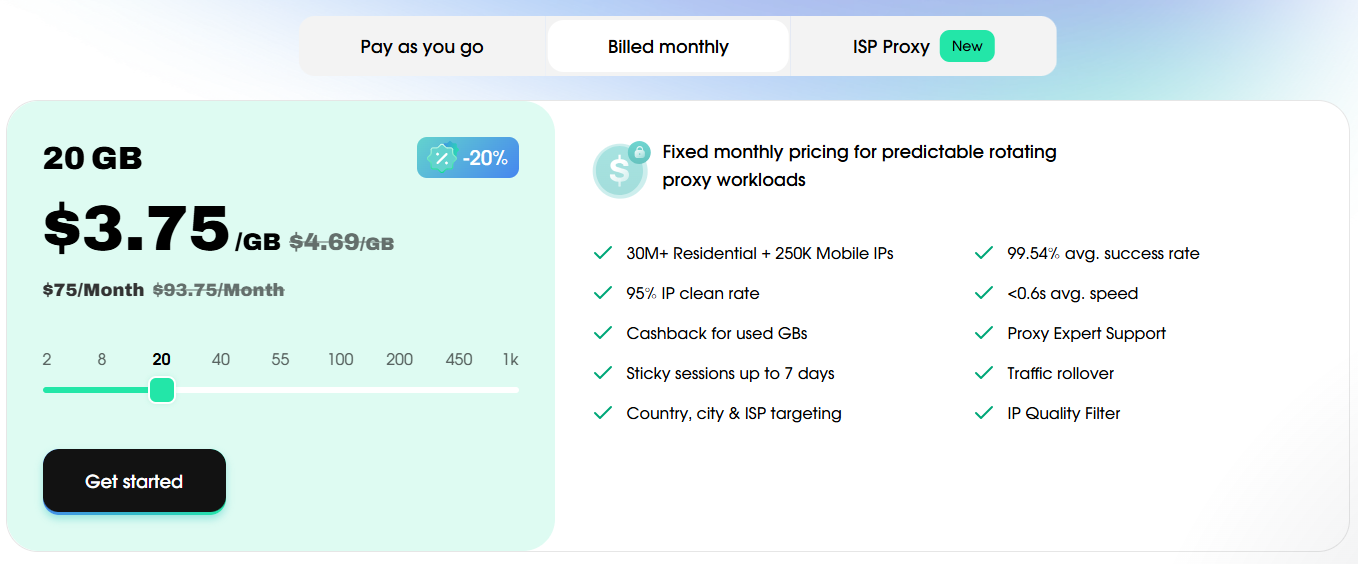
- Pricing: From ~€30 for 5GB (~€6/GB). Traffic rollover · unused data carries forward. Promo code OFM35 takes 35% off all proxy types, reducing effective cost to ~€3.9/GB.
- Best for: OFM agencies managing 5–30 creators. The “Goldilocks zone” between cheap dirty proxies and Bright Data enterprise complexity.
- Works with: Dolphin{anty}, GoLogin, AdsPower · HTTP and SOCKS5, standard user:pass authentication.
NodeMaven · The Goldilocks Proxy for Growing OFM Agencies
Budget proxies get your accounts flagged. Bright Data charges enterprise prices and requires KYC paperwork. NodeMaven sits exactly between them · filtered residential IPs, 7-day sticky sessions, city-level targeting, and no minimum commitment. For agencies managing 5–30 creators, this is the standard.
GET NODEMAVEN · 35% OFF (Code: OFM35) → Compare vs Bright Data and ProxyWing →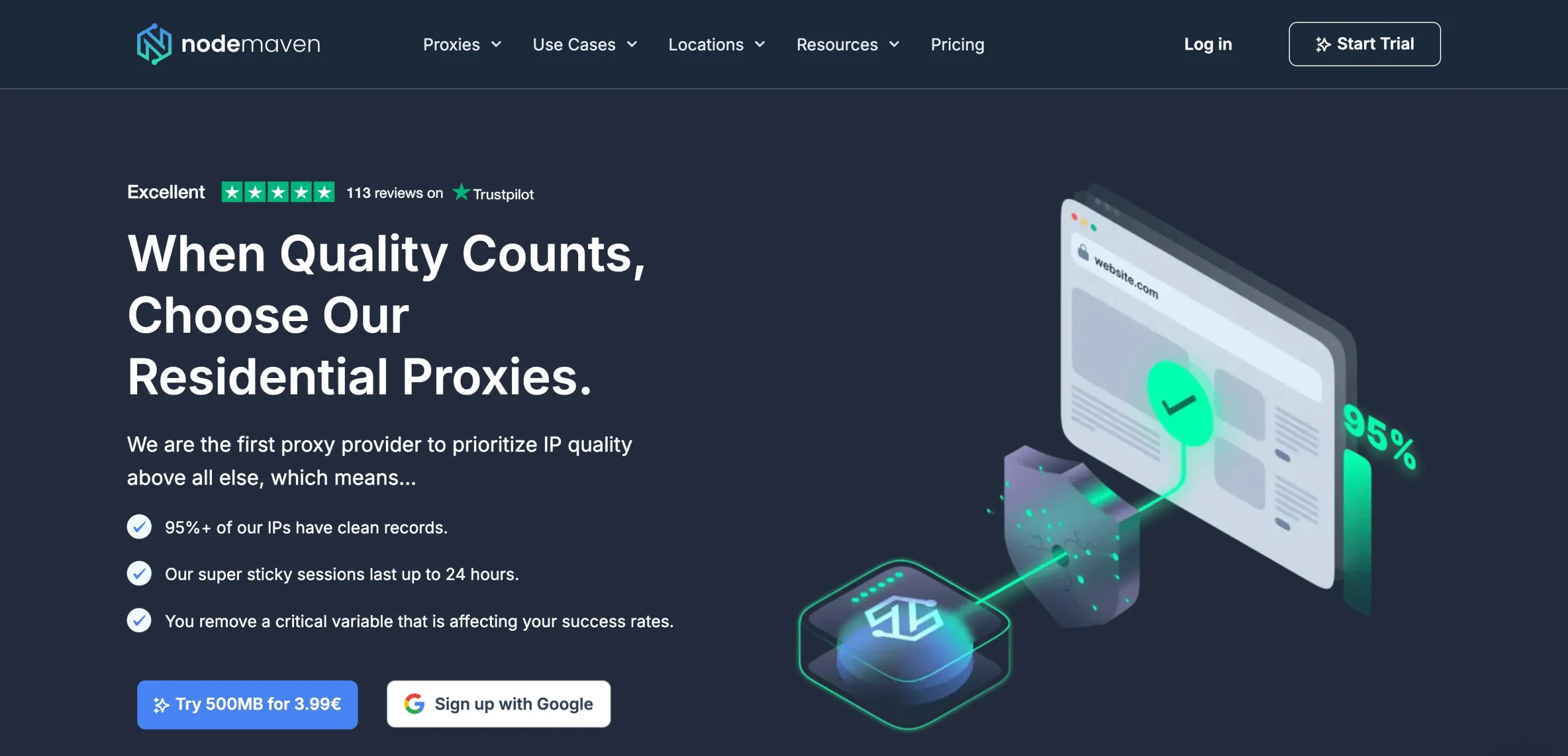
There’s a proxy problem that nobody talks about openly in OFM circles: the “dirty IP roulette.” You buy a residential proxy from a budget provider. It worked fine for the last agency that used it. But that agency got banned, and the IP’s fraud score is now 65/100 on Scamalytics. You don’t know this until OnlyFans triggers a security review on your creator’s account mid-shift.
The standard response is to run every new IP through Scamalytics manually before using it. This works · but it takes time, it requires knowing to do it, and it’s a workaround for a problem that shouldn’t exist at all if your proxy provider was filtering IPs before assigning them.
NodeMaven’s core proposition is that they do this filtering automatically before the IP reaches you. The Quality Filter is the feature that makes NodeMaven worth a review for OFM agencies specifically · not the pool size, not the pricing, but the systematic elimination of the dirty IP problem.
Why NodeMaven Is the Goldilocks Zone for OFM
The OFM proxy market has three tiers, and most agencies either underspend or overspend for their actual scale.
Budget tier ($0.50–$2/GB): Datacenter IPs, recycled residential ranges, no IP quality filtering. High fraud scores. Frequent KYC triggers. The “I’ll just use a VPN” approach. Acceptable for non-sensitive scraping. Dangerous for creator account management.
Enterprise tier (Bright Data, $4–$8+/GB): 400M+ IPs, maximum subnet diversity, GDPR certified, KYC mandatory. The correct choice for 50+ creator operations where a cascade ban is an existential event. Overkill and poor ROI below that scale.
NodeMaven’s tier (~€3–6/GB effective): Filtered residential and mobile IPs with built-in quality screening, 7-day sticky sessions, city/ISP targeting, no KYC, no minimum commitment, traffic rollover. Designed for exactly the 5–30 creator agency that needs professional infrastructure without enterprise complexity.
The Quality Filter: Stop Running Scamalytics Manually
This is the feature that justifies NodeMaven for OFM agencies. Every proxy provider claims “high quality IPs” · NodeMaven has a documented, verifiable mechanism for delivering that claim.
The practical effect for OFM agencies: you can assign a NodeMaven IP to a creator profile and trust that it’s clean without running it through a manual fraud score checker first. The filter has already done that work. For agencies managing 10+ creators, this saves hours of manual verification per month · and eliminates the category of account flags caused by inheriting a previous user’s bad IP history.
Sticky Sessions and City-Level Targeting for OFM
NodeMaven offers sticky sessions up to 7 days on both residential and mobile proxy pools. For OFM creator account management, this is the specification that matters most · more than pool size, more than raw speed.
A 7-day sticky session means the same IP is maintained across hundreds of login sessions over an entire week. The creator account builds consistent location history with that IP. OnlyFans’ behavioral systems see a pattern that looks exactly like a real user logging in from their home connection day after day. No Travel Risk flags. No location inconsistency triggers. No mid-shift IP rotation causing security reviews.
City-level and ISP-level targeting allows you to match the proxy location to the creator’s registered location. A creator registered in Miami gets a Miami-area residential IP from a local ISP. A creator registered in London gets a UK residential IP. The geographic consistency reinforces the “real home user” behavioral pattern at the network level.
Performance: Speed and Stability for OFM Workflows
US and EU Performance
For OFM agencies managing creators based in the US, UK, Western Europe, and Canada · the primary markets · NodeMaven performs well. Sub-0.6 second response times are sufficient for text-based DM conversations, PPV delivery, and standard OnlyFans browsing workflows. 4K video file uploads don’t benefit meaningfully from proxy response time (the bottleneck is upload bandwidth, not proxy latency), but they don’t suffer from NodeMaven’s performance either.
The APAC Caveat
NodeMaven’s performance degrades meaningfully for Asia-Pacific routing. Response times above 2 seconds and higher failure rates are documented for APAC-targeted sessions. If your agency’s chatters are based in the Philippines managing US creator accounts, this doesn’t affect you · the proxy is assigned per creator account (US-based), not per chatter location. But if you’re managing creators registered in Asia-Pacific markets, NodeMaven may not be the right tool for those specific accounts. Use a provider with stronger APAC infrastructure for that subset.
Setup Guide: NodeMaven + Dolphin{anty} / AdsPower
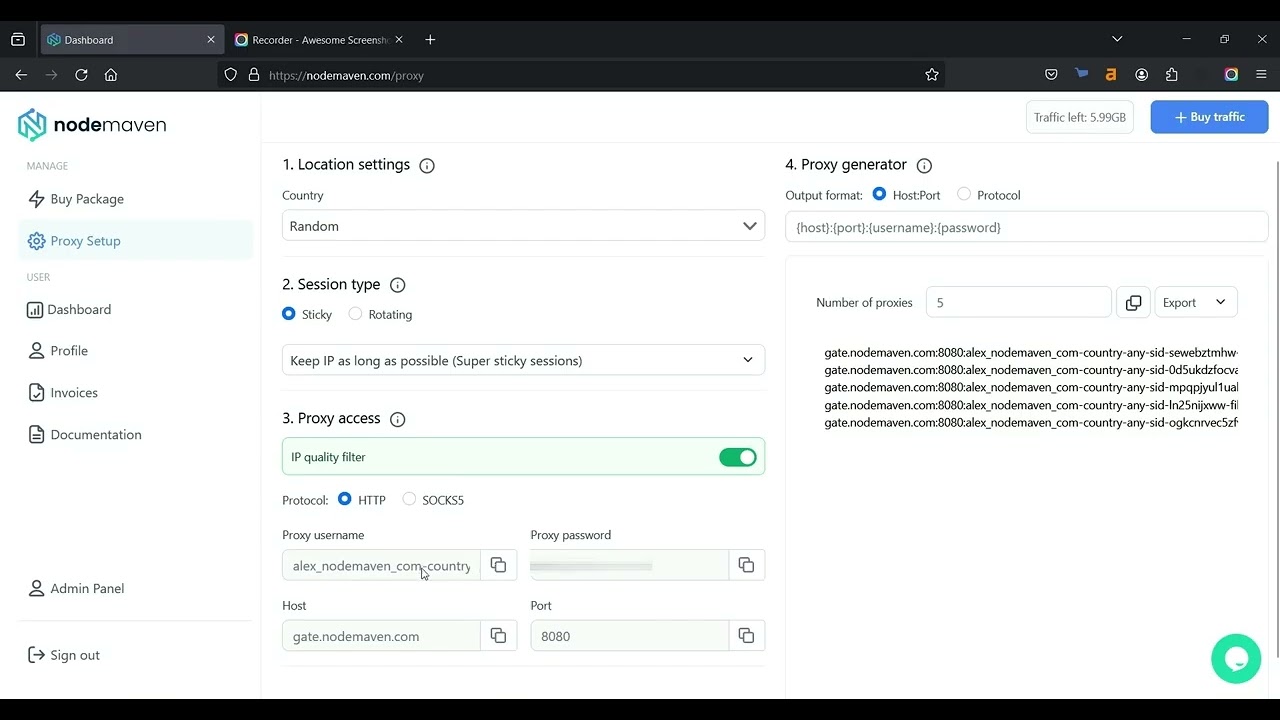
After signup, in the NodeMaven dashboard, ensure the IP Quality Filter is enabled (it should be on by default). Set your fraud score threshold to 5 or lower for maximum cleanliness.
Select proxy type (Residential), country (match to creator’s registered location), city (match to creator’s city), and sticky session duration (24h for daily shifts, 7 days for weekly stability). Copy the generated SOCKS5 endpoint in format: host:port:username:password.
Open the creator’s Dolphin profile. In the Proxy tab, select SOCKS5, paste the credentials. Click Test Connection · confirm the reported IP location matches the creator’s city. Confirm the ASN shows as a residential ISP, not a datacenter.
In Dolphin’s fingerprint settings, ensure WebRTC is set to “Altered” · reporting the proxy IP rather than the real device IP. This closes the WebRTC leak vector that bypasses proxy protection entirely.
After pasting NodeMaven credentials in AdsPower’s proxy tab, run the built-in IP Checker before launching the profile. Confirms proxy health and location match before any live account interaction.
Pricing: Data Rollover and the Real Cost Per GB
Traffic Rollover: The Feature That Changes the ROI Calculation
Most proxy providers operate on “use it or lose it” monthly billing. Buy 10GB, use 3GB, lose 7GB at month end. For OFM agencies whose bandwidth consumption varies with content upload schedules, this model wastes money systematically.
NodeMaven carries unused bandwidth forward to the next billing cycle as long as your subscription remains active. A light month (low content uploads, mostly text chatting) doesn’t waste data · it banks it for a heavy month (large vault uploads, new creator onboarding). Over time, your effective cost per GB drops because you’re actually consuming all purchased data rather than losing a portion each month.
Combined with the OFM35 promo code (35% off all proxy types), the effective residential proxy rate drops to approximately €3.9/GB · competitive with mid-tier providers at significantly higher IP quality.
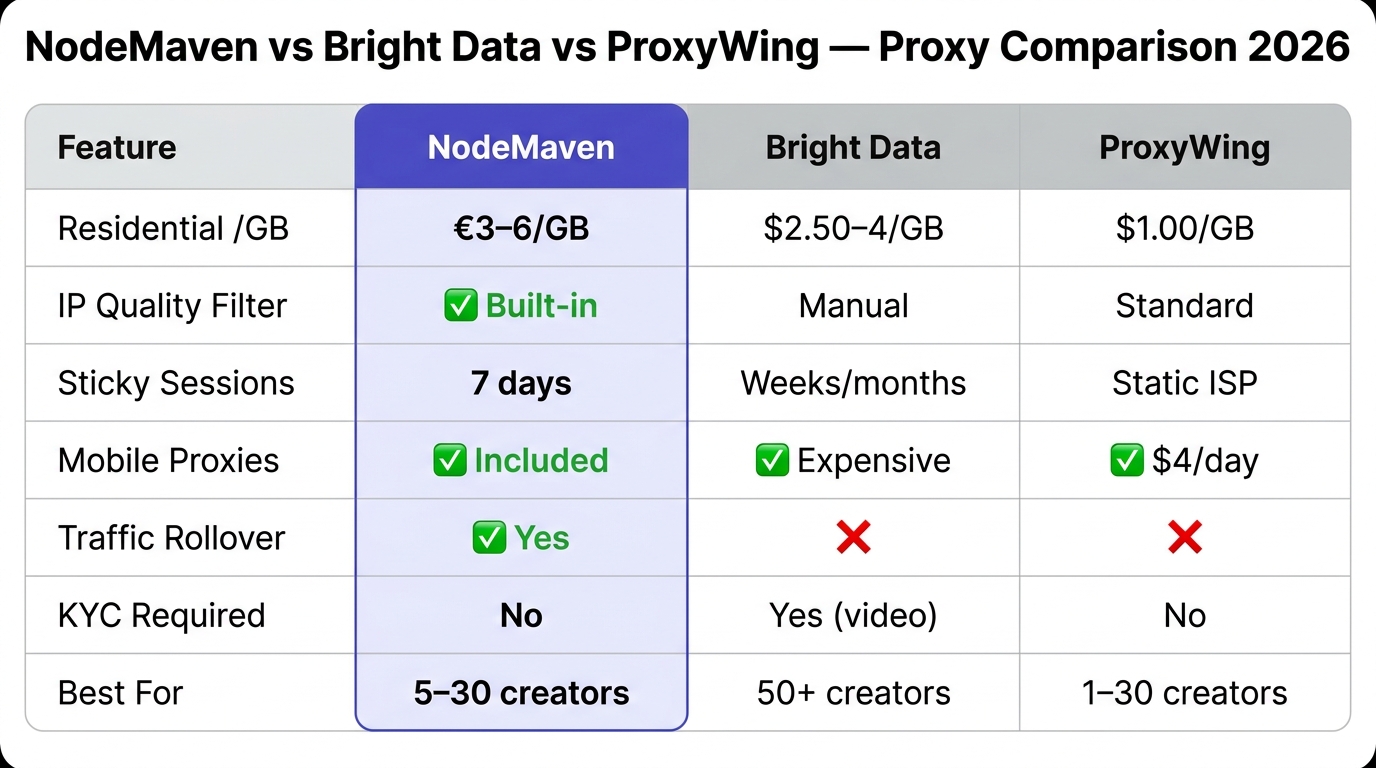
NodeMaven vs Bright Data vs ProxyWing
How to Choose Between Them
Choose NodeMaven if you want automated IP quality filtering, 7-day sticky sessions, and traffic rollover in a package that requires no KYC and no technical complexity. The best choice for agencies that want to stop manually verifying IPs. See how it ranks against every proxy service we review.
Choose ProxyWing if your primary metric is cost per GB on residential proxies ($1.00/GB is the lowest in this comparison) and you’re comfortable running your own IP verification. Better for high-volume promotional account workflows where bandwidth consumption is the main cost driver.
Choose Bright Data when you’ve crossed 50+ creators and subnet diversity becomes a portfolio risk management concern. Not before.
- Built-in Quality Filter · automated fraud score screening
- 95% clean IP rate, avg fraud score <5/100
- 7-day sticky sessions · longest in this comparison
- Residential + mobile in the same pool
- Traffic rollover · unused data never expires
- City-level and ISP-level targeting
- No KYC, no minimum commitment
- Simple setup · plug into any anti-detect browser
- More expensive per GB than ProxyWing ($1.00/GB)
- Weaker APAC performance (>2s latency)
- Smaller pool than Bright Data (30M vs 400M+)
- No ISP static proxies (residential only)
- No free plan or trial · paid plans only
FAQ: NodeMaven for OnlyFans Management
NodeMaven doesn’t impose restrictions on OnlyFans account management. Their marketing targets “social media management” and “account management” as primary use cases · which is precisely what OFM agency operations are. They’re widely used and recommended in OFM infrastructure guides. When describing your use case during signup, “multi-account social media management” is the accurate and accepted framing. There’s no adult content restriction on proxy usage · the proxy routes your browser sessions, not your content.
Text-based chatting (DMs, messages) consumes 5–20MB per hour of active conversation · effectively negligible. The bandwidth that accumulates is content uploads: a single 4K video is 2–8GB. For a creator with active chatting and weekly vault uploads, budget 10–15GB/month per creator. For chatting-only operations with minimal uploads, 3–5GB/month per creator is sufficient. NodeMaven’s traffic rollover means light months bank data for heavy months · a 5–10GB starter plan is reasonable for a 1–3 creator operation.
In NodeMaven dashboard, generate a SOCKS5 endpoint with your target country/city. Copy the string in host:port:user:pass format. In Dolphin{anty}, open the creator’s profile → Proxy tab → select SOCKS5 → paste the four fields → click Test. That’s it. The entire process takes under 30 seconds. Same process for AdsPower and GoLogin · all three browsers use the same SOCKS5/HTTP credential format that NodeMaven provides.
Both are included in the same NodeMaven plan · mobile proxies don’t cost extra. Residential proxies use home Wi-Fi device IPs · the right choice for creator accounts on OnlyFans where a consistent home-connection profile builds behavioral trust. Mobile proxies use 4G/5G cellular IPs · the right choice for ToF promotional accounts on Twitter/Reddit/Instagram, where mobile ASNs have different (often more favorable) detection profiles than residential ones on social platforms. A single NodeMaven plan covers both use cases without needing separate provider subscriptions.
Sticky sessions on residential proxies work by keeping you assigned to the same real user’s device as long as that device is online. If the device owner turns off their phone or router, that IP goes offline and NodeMaven’s system assigns a replacement from the same city and ISP configuration. This is the standard behavior for residential proxies · it’s not avoidable without moving to ISP static proxies (which NodeMaven doesn’t currently offer). For creator accounts where absolute IP permanence is required, consider ISP static proxies from ProxyWing or Bright Data instead. For most OFM workflows, NodeMaven’s 7-day sticky with same-city replacement is sufficient.
Proxies Sorted. Now Build the Team.
NodeMaven handles IP quality. The next operational constraint is hiring and training chatters who convert fans into revenue. Here’s the complete hiring and training framework.
READ THE CHATTER HIRING GUIDE →