AdsPower Review (2026): The Automation Engine for Large OFM Agencies
 By The OFM Audit Team • 13 min read
Prefer to watch? We demo AdsPower’s RPA automation and Synchronizer for OFM agencies in this video:
- What AdsPower does that others don’t: RPA (Robotic Process Automation) · no-code drag-and-drop workflows that automate repetitive browser actions across 50+ profiles simultaneously. One person does the work of three VAs.
- Best for: Large OFM agencies (20+ creators) running active ToF promotion across Reddit, Twitter/X, and Instagram. The automation ROI only makes sense at scale.
- vs GoLogin: AdsPower is harder to set up but dramatically cheaper at volume ($9/mo for 10 profiles) and has automation capabilities GoLogin can’t match. GoLogin wins on ease; AdsPower wins on power and price.
- Security incident (Jan 2025): A supply chain attack compromised AdsPower’s extension loader. $4.7M in crypto was stolen from affected users. For OFM agencies (OnlyFans logins, not crypto wallets), the risk is lower. Since then, AdsPower has obtained SOC 2 Type II, ISO 27001, and ISO 27701 certifications · the most comprehensive security audit stack of any anti-detect browser in 2026.
- Pricing: Free (2 profiles permanent) · Base $5.4/mo (10 profiles) · Pro ~$30/mo (100 profiles) · Custom for 500+ profiles. Note: entry price dropped significantly in 2026 · now the cheapest certified anti-detect browser on the market.
- Scale: 9M+ users across 200+ countries. 50+ fingerprint parameters across 25 categories. 1,000 profiles importable per batch via Excel/TXT.
AdsPower · The Engineer’s Choice for 20+ Creator Agencies
GoLogin is beautiful. Dolphin{anty} is elegant. AdsPower is the tool that replaces two VAs with a script. The UI is dense and the learning curve is real · but for agencies running large-scale ToF promotion across multiple platforms, no other anti-detect browser comes close to its automation depth at this price point.
TRY ADSPOWER FREE · GET 10% OFFwith code ofmtools →
Disclosure: some links on this page are affiliate links. If you sign up through them we may earn a commission at no extra cost to you · and you get an exclusive discount.
At 50 creator accounts, manual ToF promotion becomes mathematically impossible. You have 50 Reddit profiles to warm up, 50 Twitter accounts to post from, 50 Instagram burner accounts to drive traffic · and all of it needs to look like genuine human behavior to avoid detection and bans.
Doing this manually requires 3–4 VAs working in parallel. Alternatively, it requires AdsPower’s RPA engine running while you sleep.
This is the specific gap AdsPower fills in the OFM tool stack. It’s not the prettiest browser. It’s not the easiest to configure. It is the most powerful automation platform available at the price point, and for large agencies where ToF promotion is a core revenue driver, that distinction matters more than interface aesthetics.
Complete your stack: an antidetect browser without the right IP layer is useless · read our OnlyFans VPN guide.
What AdsPower Does (The Industrial Browser)
AdsPower is a dual-kernel anti-detect browser with a built-in automation platform. The “anti-detect” part works like GoLogin or Dolphin{anty} · isolated browser profiles with spoofed fingerprints, each running with its own proxy. The “automation” part is what separates it from every competitor.
Two browser engines are available within the same AdsPower installation:
- Chrome-based fingerprints
- Most common browser profile
- Best compatibility with most platforms
- Best for OnlyFans, most ad platforms
- Higher trust score on Chrome-optimized sites
- Firefox-based fingerprints
- Distinct Canvas/WebGL signatures from Chrome
- Less common = harder to group with Chrome profiles
- Useful for diversifying fingerprint pool
- Some platforms have historically lower fraud detection on Firefox
For OFM agencies, the practical benefit of dual engines is fingerprint pool diversification. If all 50 of your promotional accounts show Chrome fingerprints, a pattern-detection algorithm has an easier time grouping them. Mixing SunBrowser and FlowerBrowser profiles across your promotional accounts creates a more heterogeneous fingerprint distribution that looks closer to a random user population.
RPA Automation: Replacing VAs with No-Code Scripts
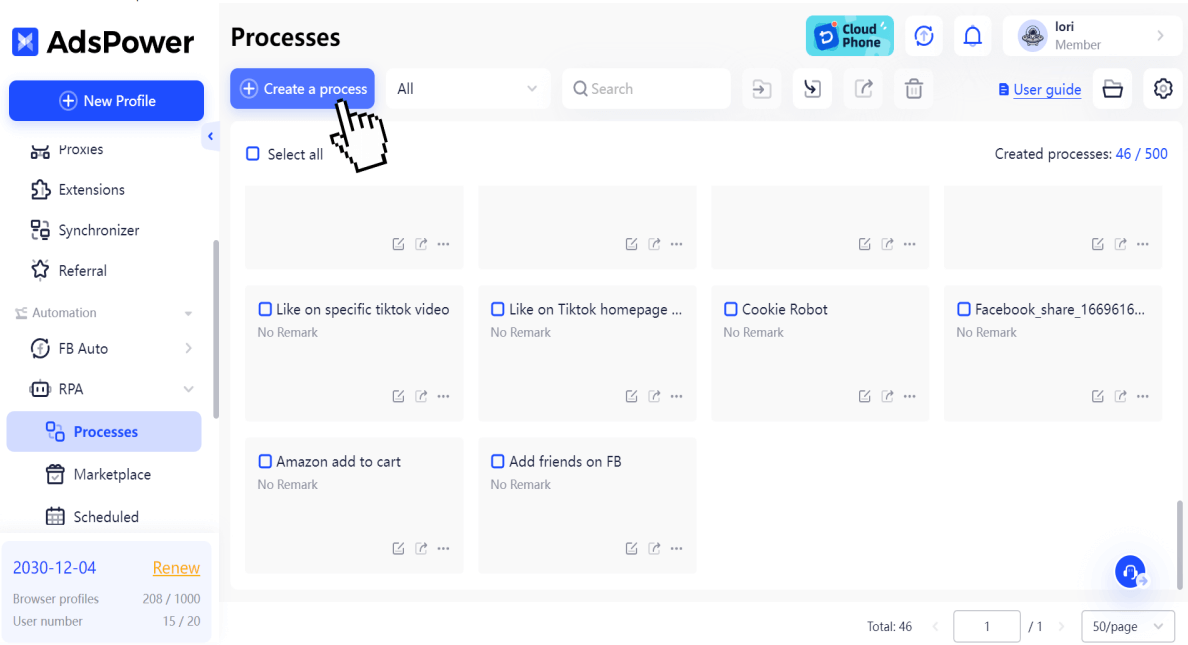
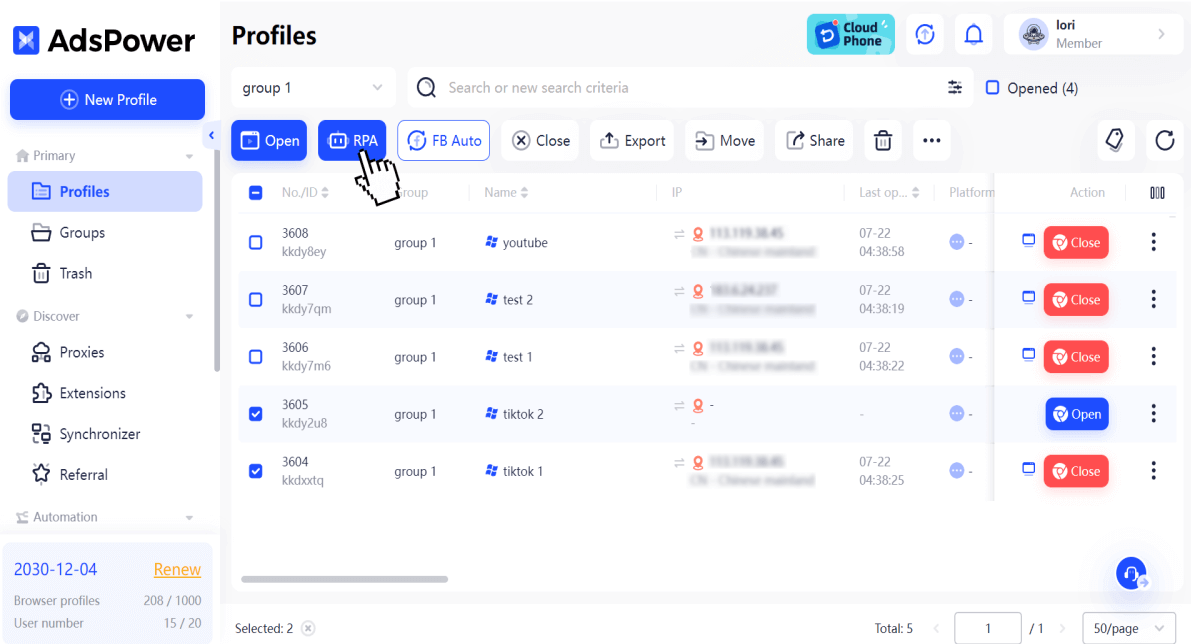
This is the feature that justifies AdsPower’s existence for large agencies. RPA (Robotic Process Automation) is the ability to record and replay browser actions · clicks, scrolls, form fills, navigation · automatically across multiple profiles simultaneously.
AdsPower’s RPA uses a drag-and-drop interface. No Python. No Selenium. No coding knowledge required. You build a workflow by connecting action blocks in a visual sequence.
A Real OFM Reddit Warm-Up Workflow
Here’s a functional RPA workflow I built in under 10 minutes for warming up new Reddit promotional accounts:
This workflow runs across 10, 20, or 50 AdsPower profiles simultaneously. What would take a VA 3–4 hours of manual work completes automatically in under 30 minutes. The randomized wait times (3–8 seconds, 5–12 seconds) are critical · fixed-interval actions are a behavioral detection signal. Human behavior is irregular; the script mimics that irregularity.
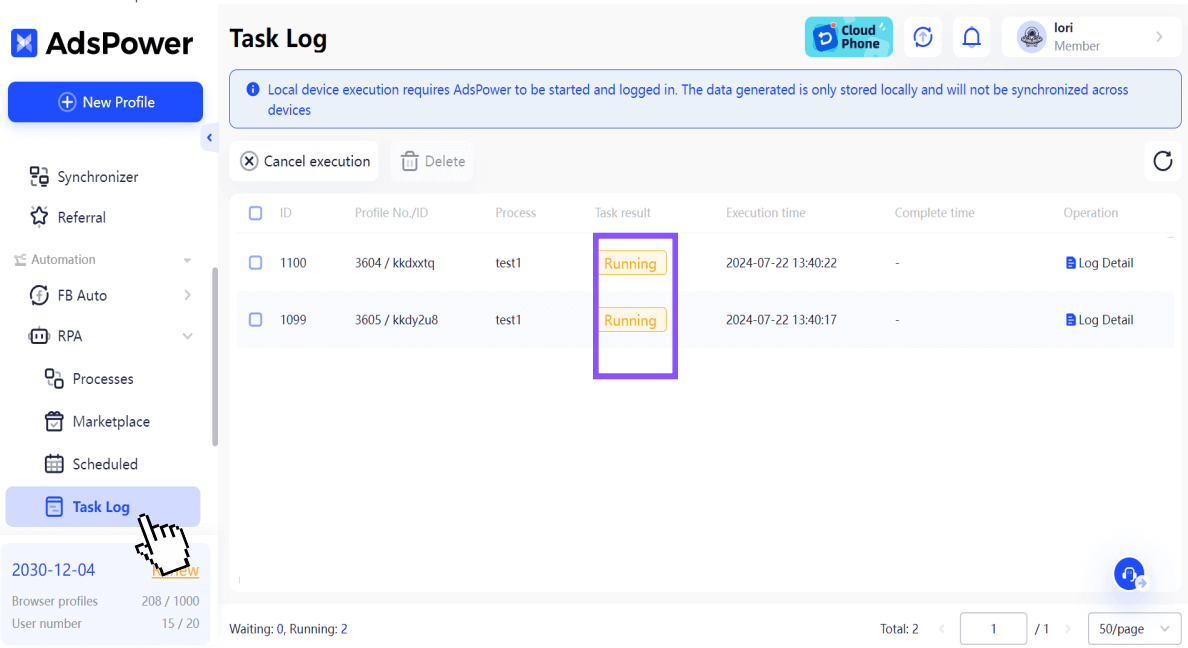
The RPA Marketplace
AdsPower has a community marketplace of pre-built RPA templates. Users share workflows for common tasks · Twitter/X follow campaigns, Instagram account warming, Reddit upvote patterns. For OFM agencies, this means you don’t have to build from scratch. Import a Reddit warm-up template, modify the target subreddits, assign your profiles, and run.
RPA Plus (Advanced Mode)
RPA Plus extends the standard RPA with task management and workflow reuse. The key difference: with standard RPA you create and run a process once. With RPA Plus, you save it as a reusable task and run it repeatedly without reconfiguring from scratch. For agencies running the same warm-up sequence daily across 50 accounts, this eliminates repetitive setup entirely.
RPA Plus also adds debug-from-any-step capability, workflow variable management, step grouping for clarity, and execution result review by task and batch run. For complex multi-step promotion workflows · conditional Reddit posting sequences, scheduled Twitter engagement chains · RPA Plus is the right tool. Standard RPA handles one-off or simple sequences; RPA Plus handles recurring, high-frequency automation that needs to be maintained and adjusted over time.
Both RPA and RPA Plus are currently free to use within AdsPower · the automation layer doesn’t add cost on top of the profile subscription.
with code ofmtools →
The Synchronizer: Mass Actions Across Profiles
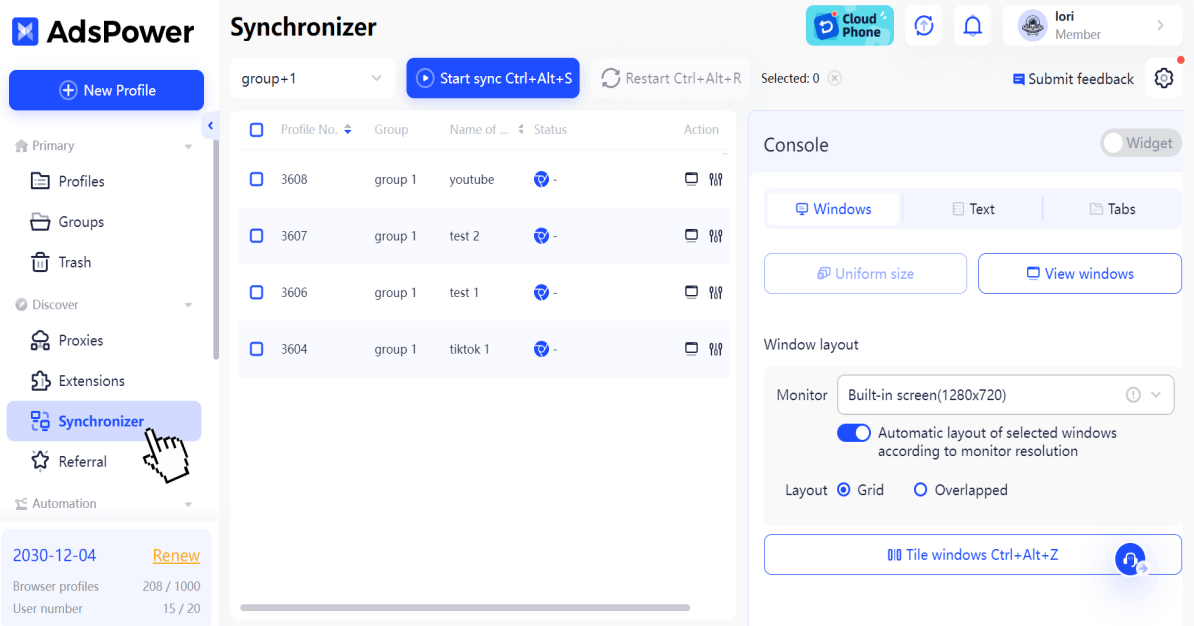
The Synchronizer is a separate tool from RPA that allows real-time mirroring of your mouse and keyboard actions across multiple open browser windows simultaneously. It works on both Windows and Mac, across single, dual, triple, or multiple screens · no coding or configuration required.
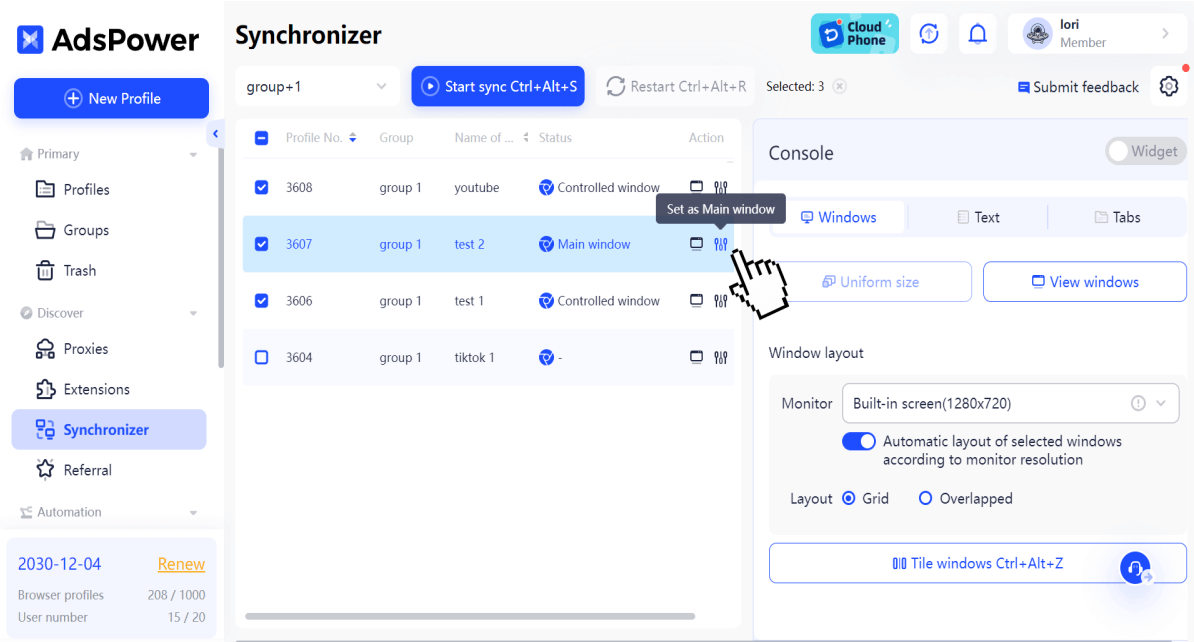
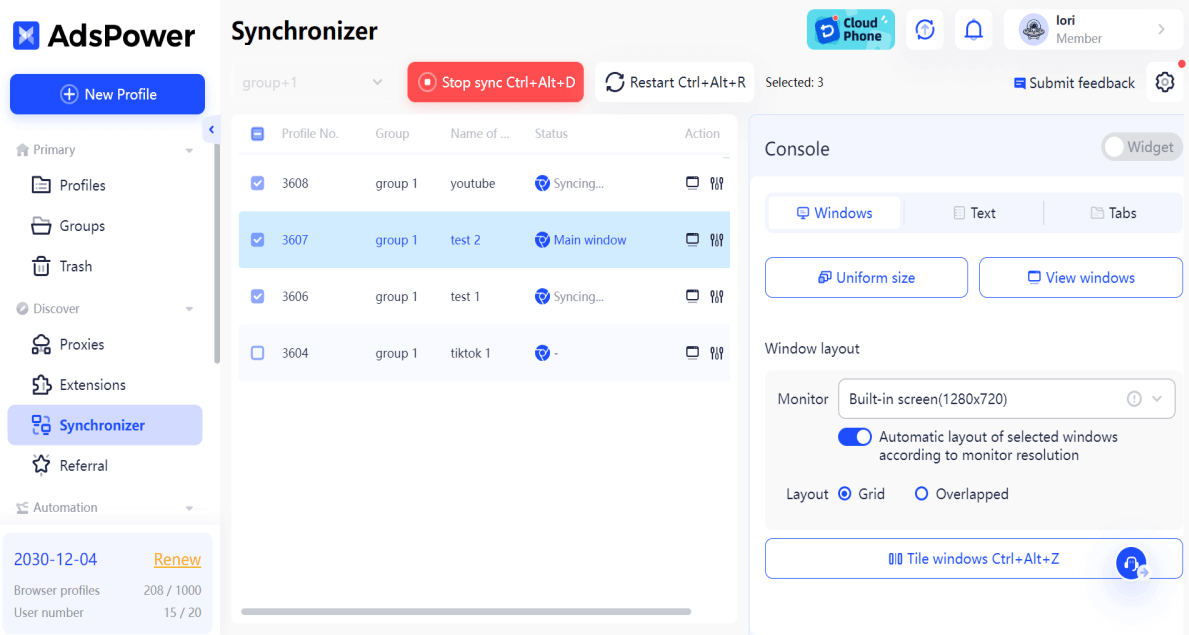
You open your AdsPower profiles, click “Synchronizer,” select the profiles you want to control, set the main window, and click “Start sync.” Whatever you type, click, or scroll in the main window mirrors instantly across every controlled window. You can sync from 2 profiles to thousands · there is no hard limit on the number of windows.
One important nuance from AdsPower’s official documentation: the Synchronizer adds randomized delays to each mirrored action, producing human-like variance. Synced windows behave naturally · they look like a real user operating separate devices, not a bot firing identical actions at identical milliseconds. This is the key safety feature that makes the Synchronizer usable for account management rather than just bulk administrative tasks.
OFM Use Cases for the Synchronizer
- Bulk password rotation: Change the password across 20 promotional Twitter accounts in 2 minutes by typing once in the main window.
- Profile setup at scale: Fill out bio, upload profile picture, and configure settings across 15 new Reddit accounts simultaneously.
- Content posting: Post promotional content to multiple Reddit or Twitter accounts. The built-in randomized delay between windows means posts don’t land at the identical second · reducing the behavioral detection signal.
- Cookie warming: Navigate through the same warm-up URLs across multiple profiles at once to build browsing history more efficiently.
- Preset text and tab operations: AdsPower allows you to preset specific texts and tab sequences · the Synchronizer will then execute them in batches across all selected profiles.
Setup Guide: AdsPower + Proxies for OFM
AdsPower supports bulk profile creation via CSV/Excel import. Prepare a spreadsheet with columns for profile name, proxy (IP:port:user:pass), User Agent, and fingerprint parameters. Upload it and AdsPower generates all profiles simultaneously. For 50 promotional accounts, this takes under 5 minutes versus creating each individually.
AdsPower has a built-in IP Checker that tests a proxy for blacklist status, geolocation accuracy, and speed before it’s assigned to a profile. Run every new proxy through the IP Checker before using it on a live account. A blacklisted IP assigned to a valuable OnlyFans creator account is an account security incident waiting to happen.
Creator accounts should use SunBrowser (Chrome-based, highest platform compatibility). Promotional ToF accounts · Reddit burners, Twitter promo accounts · can be mixed between SunBrowser and FlowerBrowser to diversify the fingerprint pool.
AdsPower’s Cookie Robot automatically visits a configurable list of mainstream websites (Google, YouTube, Amazon, Reddit homepage) to build browsing history and cookie data before the profile is used on target platforms. A “warm” profile with natural browsing history is treated very differently from a fresh profile with zero cookies when it first appears on a platform.
In profile settings, disable hardware acceleration. This prevents GPU-level rendering signatures from leaking through despite the Canvas/WebGL spoofing. A subtle but important setting that most new AdsPower users miss.
Before sharing profiles with VAs, configure their permission levels in the AdsPower team panel. VAs should have User-level access (can open and use profiles) without Manager access (which allows proxy and fingerprint modification). Enable Action Logs to maintain a full audit trail of every action taken under each team member’s credentials.
The January 2025 Security Incident: What Happened and What It Means for OFM
In January 2025, AdsPower suffered a supply chain attack. Hackers compromised the software’s extension auto-update mechanism and replaced the MetaMask browser extension with a malicious version that exfiltrated wallet seed phrases. Users who had crypto wallets active in AdsPower lost an estimated $4.7 million.
This is a serious incident and it’s important to address it directly rather than bury it. Here’s the honest assessment for OFM agencies specifically:
What was compromised: Browser extension integrity. Specifically, the auto-update pipeline for browser extensions installed within AdsPower profiles.
What was not compromised: AdsPower’s fingerprint engine, proxy infrastructure, session data, or login credentials stored in the browser password manager.
The OFM-specific risk assessment: OFM agencies do not store crypto wallets in AdsPower profiles. The attack vector · malicious crypto wallet extension · is not relevant to the typical OFM use case. For agencies using AdsPower exclusively for browser session isolation and ToF promotion automation, the January 2025 incident does not represent a direct threat to their operations.
What happened after: AdsPower responded by obtaining the most comprehensive security certification stack of any anti-detect browser as of 2026: SOC 2 Type II (independently audited under AICPA standards, verifying security controls operate effectively over time), ISO 27001 (information security management), and ISO 27701 (privacy information management, GDPR-aligned). No other anti-detect browser holds all three certifications simultaneously. The company also runs an active bug bounty program and a dedicated anti-phishing team monitoring for fraudulent sites impersonating AdsPower.
What you should do regardless of certifications: Never install financial extensions (crypto wallets, banking extensions) in AdsPower profiles. Keep your OnlyFans creator account credentials in a separate secure password manager (Bitwarden, 1Password), not stored in AdsPower’s internal browser. Enable 2FA on all creator accounts using an authenticator app on a separate device · not stored in AdsPower.
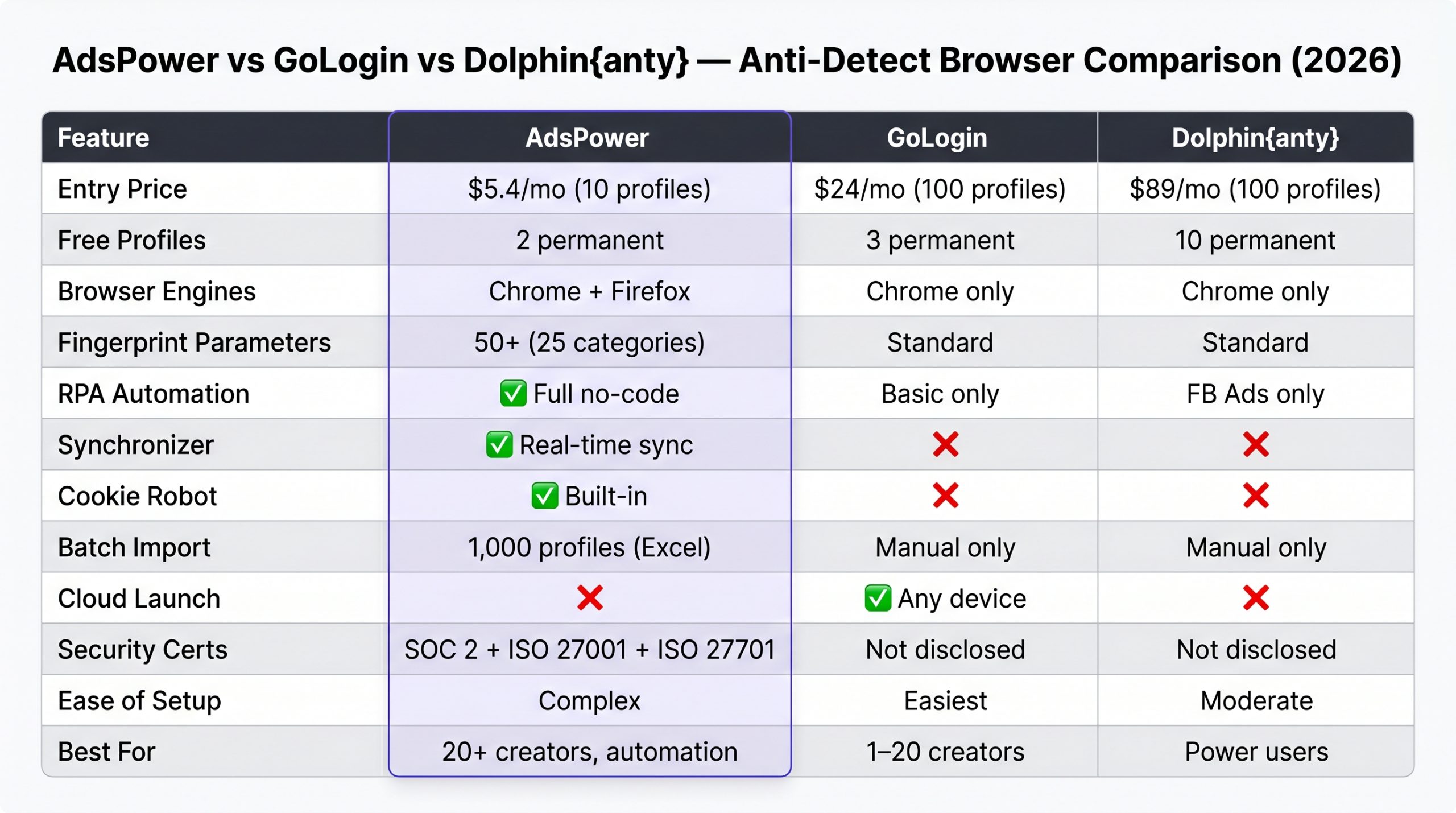
AdsPower vs GoLogin vs Dolphin{anty}
The Honest Verdict
If you’re managing fewer than 20 creator accounts and your primary use case is session isolation for chatters, GoLogin is the better starting point. Easier setup, cleaner UI, Cloud Launch for emergency access. You can compare it against all our anti-detect browser reviews before deciding.
If you’re running 20+ creators and actively doing large-scale ToF promotion across Reddit, Twitter/X, and Instagram · warming up dozens of accounts, running follow campaigns, scheduling posts · AdsPower’s RPA engine and Synchronizer create operational leverage that GoLogin simply can’t match. The learning curve is the price you pay. It’s worth it at scale.
with code ofmtools →
Pricing: The Cost-Per-Profile Advantage
| Plan | Profiles Included | Monthly Cost | Cost Per Profile |
|---|---|---|---|
| Free (permanent) | 2 | $0 | $0 |
| Base | 10 | $5.4/mo | $0.54/profile |
| Pro | 100 | ~$30/mo | ~$0.30/profile |
| Custom | 500+ | Negotiated | ~$0.10–0.15/profile |
- Cheapest cost-per-profile at scale
- Full no-code RPA automation
- Synchronizer for bulk real-time actions
- Dual browser engine (Chrome + Firefox)
- Built-in Cookie Robot for auto warm-up
- IP Checker before proxy assignment
- Bulk profile creation via CSV
- Granular action logs for VA oversight
- Steepest learning curve in the market
- Dense UI · overwhelming for non-technical users
- January 2025 security incident damages trust
- Slower Chrome kernel update cycle
- No Cloud Launch (desktop install required)
- No mobile app
- Only 2 free profiles
FAQ: AdsPower for OnlyFans Management
The 2025 incident was a supply chain attack targeting browser extensions · specifically crypto wallet extensions. OnlyFans session data and login credentials stored in the browser were not directly targeted or compromised in the reported incident. For OFM agencies that don’t install crypto wallet extensions in AdsPower, the immediate risk is lower than the headlines suggest. That said, the correct posture is to never store financial credentials or 2FA codes inside AdsPower profiles regardless of the platform’s security claims. Keep payout settings and banking credentials in a separate secure password manager with 2FA on a separate device.
No. The standard RPA interface is drag-and-drop · you connect action blocks (Open URL, Click, Scroll, Wait, Type) without writing any code. The RPA Marketplace has pre-built templates for common tasks (Reddit warm-up, Twitter follow campaigns) that you can import and modify by just changing target URLs and timing parameters. RPA Plus offers conditional logic for more advanced use cases, where basic logical thinking helps but coding knowledge isn’t required. Most agency operators learn the standard RPA within a day of use.
They serve different parts of the OFM operation. Dolphin{anty} is better for the chatting layer · the actual management of creator accounts and DM operations, where the priority is session isolation, team access control, and account security. AdsPower is better for the promotion layer · the ToF accounts on Reddit, Twitter, and Instagram that drive traffic to creators’ pages, where the priority is automation, scale, and cost efficiency. Many large agencies run both: Dolphin{anty} for creator account management, AdsPower for promotional account automation.
Technically yes · RPA can automate any browser action including on OnlyFans. Practically, this is high-risk and not recommended. OnlyFans has behavioral detection systems that flag automated DM patterns · fixed-interval messages, identical message content, unusual response speed. Automating DMs on creator accounts risks triggering platform restrictions or bans on high-value accounts. The correct use of AdsPower for OFM is automating promotional activities on external platforms (Reddit, Twitter, Instagram) · not automating the creator accounts themselves. Use trained chatters for the creator account inbox.
For promotional accounts (Reddit burners, Twitter promo, Instagram warm-up), rotating residential proxies work fine · you’re not maintaining a persistent account reputation the same way as with creator accounts. NodeMaven, Bright Data, or Oxylabs rotating residential plans at $5–15/month per account work well. Run each new proxy through AdsPower’s built-in IP Checker before assigning it to an active account. For creator accounts (OnlyFans logins) · use static dedicated residential proxies, not rotating, to maintain consistent location signals.
Yes. AdsPower allows you to configure profiles with Android or iOS User Agent strings and mobile-specific screen resolutions and touch event parameters. This is useful for creating Instagram and TikTok promotional accounts that appear to originate from mobile devices · which can have different detection sensitivity than desktop sessions on some platforms. The mobile fingerprint simulation is done within the desktop browser, not on an actual mobile device, so it’s not identical to genuine mobile behavior · but it adds meaningful fingerprint variety to a large promotional account fleet.
Automation Running. Now Scale the Roster.
AdsPower handles your promotional infrastructure. The next constraint is signing more creators to fill it. Here’s the recruitment funnel agencies use to sign creators without existing case studies.
READ THE RECRUITMENT GUIDE →
🔗 More in Anti-Detect Browsers