
Dolphin{anty} Review (2026): The Best Anti-Detect Browser for OnlyFans Agency Scaling?
 By The OFM Audit Team • 13 min read
Prefer to watch? We walk through Dolphin{anty}’s status boards, team setup, and OFM workflow in this video:
- What Dolphin{anty} does differently: The most operationally organized anti-detect browser · status boards, tags, notes, real-time profile sync across countries. Your manager in Paris and chatter in Manila see the same profile state in real time.
- Best for: OFM agencies with 5–50 creators and a multi-person team. The workflow density · being able to see at a glance which accounts are Ready, Warming Up, Under Review, or Banned · is unmatched.
- vs AdsPower: Dolphin wins on UI, team workflow, and day-to-day comfort. AdsPower wins on RPA automation depth and price at 100+ profiles. Most agencies use Dolphin for creator accounts and AdsPower for promotional ToF accounts.
- vs GoLogin: Dolphin has stronger team features and the best free tier (10 profiles vs GoLogin’s 3). GoLogin wins on onboarding speed and Cloud Launch.
- Pricing: Free (10 profiles · best free tier in market) · Base ~$89/mo (100 profiles) · Team seats additional.
- Data security: Client-side encryption implemented after July 2024 incident. Even Dolphin cannot see your passwords. Safe for OnlyFans credentials when combined with strong 2FA.
Dolphin{anty} · The Fleet Commander for Agency Owners
GoLogin is for solo operators. AdsPower is for automation engineers. Dolphin{anty} is for the agency boss who has 10 chatters across 3 time zones and needs to see at a glance what’s running, what’s warming up, and what just got flagged · without opening a spreadsheet.
GET 10 FREE PROFILES →Here’s the problem nobody talks about when comparing anti-detect browsers: the fingerprint isolation is table stakes. Every serious tool in this market does that reasonably well. The real differentiator at agency scale is operational workflow · how fast can your chatters switch between accounts, how clearly can you see which profiles need attention, and how safely can you hand off access to a VA in the Philippines without a 20-minute setup process every shift change.
Dolphin{anty} was built by people who understood this. It comes from the affiliate marketing world, where managing hundreds of ad accounts simultaneously is standard practice. That heritage shows in everything from the profile status system to the integrated proxy manager to the Smart Paste feature. The UI doesn’t look like accounting software. It looks like a modern SaaS dashboard built for people whose job is to move fast.
Complete your stack: see our OnlyFans VPN guide to lock down the network layer behind Dolphin Anty.
Why Dolphin{anty} Is the Choice for High-Performance OFM Teams
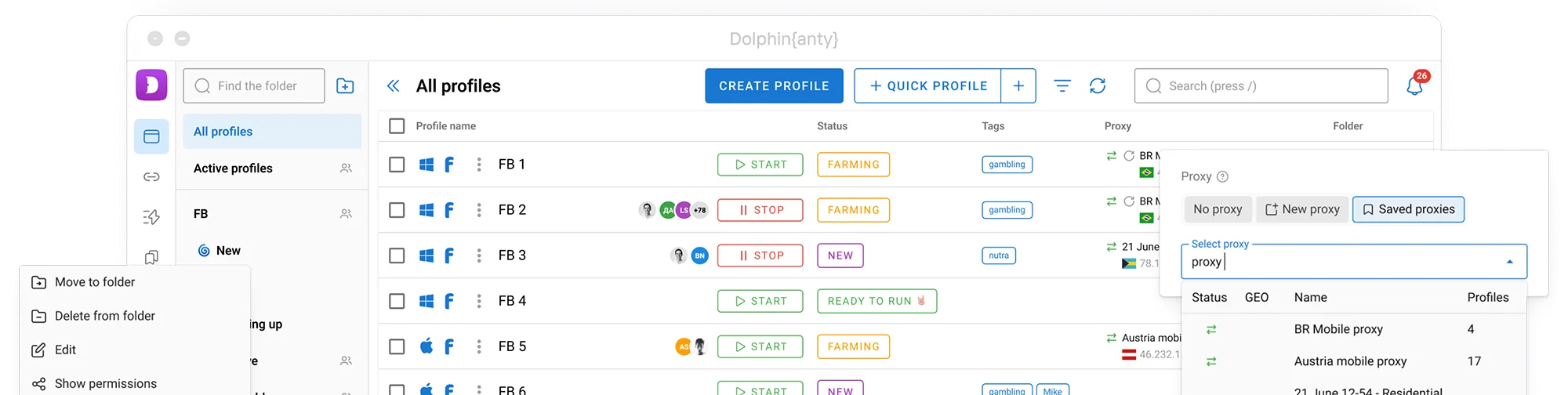
The moment you open Dolphin{anty}’s profile dashboard, you understand why affiliate marketers and OFM agencies prefer it for day-to-day operations. Every profile shows its status, proxy health, last active time, tags, and notes at a glance. No tab-switching. No spreadsheet. Everything you need to run a shift is visible on one screen.

Status Boards and Tags: The Missing Piece in Other Tools
Here’s what a Dolphin{anty} dashboard looks like for an agency managing 15 creator accounts across two chatter shifts:
Each profile can be tagged (Creator A · Shift 1, Twitter Promo, High Priority, Handle with Care) and carry notes visible to any team member who opens the profile. When a chatter starts their shift, they see exactly which accounts are ready, which need proxy rotation, and which should not be touched until the issue is resolved. No morning briefing call needed.
Smart Paste: Making Chatters Sound Human
Smart Paste is one of Dolphin{anty}’s most underappreciated features for OFM specifically. When you paste text into a field within a Dolphin profile, the Smart Paste feature simulates human typing behavior · variable speed, occasional micro-pauses · rather than the instant full-block paste that flags automated sessions on most platforms.
For chatters working in OnlyFans DMs, this matters in two ways. First, it makes the typing pattern look genuinely human to any behavioral monitoring. Second, for platforms like Twitter where rapid identical-content posting across accounts triggers spam detection, Smart Paste variance creates enough behavioral noise to avoid the pattern. It’s a small feature with real operational impact.
Proxy Management: Best-in-Class Integrated Tool
Dolphin{anty} includes a fully integrated proxy manager · you don’t need a separate tool or dashboard to manage your IP infrastructure. Every proxy is tested, monitored, and assignable directly from within the browser.
What the Integrated Proxy Manager Does
- Proxy health testing: Before a proxy is assigned to a profile, Dolphin checks it for blacklist status, speed, and geolocation accuracy. You see the result before it touches a live account.
- Bulk proxy import: Paste your residential proxy credentials list and Dolphin assigns them across profiles in one action. Setting up a 10-creator agency from scratch takes under 5 minutes.
- IP rotation via proxy URL: Dolphin supports rotation parameter URLs · the standard format for rotating residential proxy pools · meaning you can switch IPs on demand from inside the browser without logging into your proxy provider’s dashboard.
- Proxy assignment per profile: Each profile has a dedicated proxy slot. The same IP is never shared between profiles · maintaining strict IP isolation without manual management.
Team Collaboration: Managing Chatters Without Internal Risk
The way Dolphin{anty} handles team access is the primary reason OFM agencies choose it over GoLogin for creator account management. It solves the handoff problem elegantly.
Profile Sharing Without Password Exposure
When you add a chatter as a team member in Dolphin{anty} and share a profile with them, here’s what happens: the chatter opens Dolphin on their machine, sees the profiles you’ve shared, clicks Open, and the browser session launches · already logged into OnlyFans via stored cookies · without the chatter ever seeing the creator’s login credentials, password, or 2FA code.
The session state (cookies, local storage, logged-in session) lives in Dolphin’s cloud-synced profile storage, encrypted client-side before upload. Even Dolphin’s servers cannot read it. The chatter gets access to the inbox without getting access to the account.
Role System for OFM Agencies
- Admin: Full access · proxy management, fingerprint settings, team management, profile export. Agency owner only.
- User: Can open and use profiles, add notes, update status labels. Cannot modify proxy or fingerprint settings, cannot export cookies. The correct level for chatters.
- Viewer: Can see profile list and notes but cannot launch or modify. Useful for agency clients who want to monitor without interfering.
Real-Time Cloud Sync Across Time Zones
Profiles sync via cloud in real time. A manager in France updates a profile’s notes and status at 9 PM their time. A chatter in the Philippines starting their shift at 4 AM sees those changes immediately when they open Dolphin. Cookie state, notes, tags, proxy assignments · all current, all consistent across devices. No manual file transfer. No “which version is the current one” confusion.
Setup Guide: Dolphin{anty} for OFM Step by Step
In Dolphin’s dashboard, click New Profile. Name it after the creator. This is the only profile that will ever be used for that creator’s OnlyFans account and associated social media. Never use one profile for two creators.
In the proxy tab, paste your residential proxy credentials. Click Test · confirm the IP resolves to the correct location and shows clean (no blacklist flags). For creator accounts, use static residential proxies (same IP every session). Reject any proxy that fails the health check.
Use the Chromium-based fingerprint (the default). Canvas, WebGL, AudioContext, and WebRTC are all spoofed automatically. Set WebRTC to the proxy IP (not your real IP, not disabled). Ensure the User Agent matches a recent Chrome version on a common OS (Windows 10/11 or macOS). Slightly randomize screen resolution from the defaults.
Open the profile. Browse 5–8 legitimate websites for 5–10 minutes (news sites, YouTube, Reddit homepage, Google search). This builds browsing history and cookie data that makes the profile appear as a real user rather than a fresh, empty browser environment. Only log into OnlyFans after warm-up is complete.
Dolphin’s Extensions Manager lets you install Chrome extensions across multiple profiles simultaneously. Install Infloww or your CRM extension across all creator profiles in one action rather than installing per-profile manually.
Go to Team Settings. Invite chatters with User-level access. Share the relevant creator profiles with each chatter. They’ll see only the profiles assigned to them. Set their status to Ready and add shift notes. Their session starts clean every time.
Technical Audit: Is Dolphin{anty} Safe for OnlyFans in 2026?
Fingerprint Quality
Dolphin{anty} runs on a Chromium-based kernel that spoofs Canvas, WebGL, AudioContext, WebRTC, and hardware parameters. The kernel is updated regularly to stay aligned with current Chrome releases · a critical point, because a browser kernel that reports Chrome 118 while the real Chrome is at version 124 is identifiable by any fingerprinting system that checks browser version consistency.
For OnlyFans specifically, the platform’s session tracking relies heavily on Canvas and WebGL signatures. Dolphin’s automatic spoofing of these parameters · generating internally consistent fingerprints rather than purely random values · produces profiles that are indistinguishable from real users when combined with quality residential proxies.
RAM Consumption: What You Can Realistically Run
Dolphin{anty} runs each profile as a separate Chromium instance. This is how all serious anti-detect browsers work · the isolation requires separate processes. The implication: RAM consumption scales linearly with open profiles.
For agencies where one person manages multiple creator accounts simultaneously, 16GB is the practical minimum. For chatters who manage one account per session (standard shift structure), 8GB is sufficient. MacBook Air M3/M4 with 16GB unified memory handles 8–10 Dolphin profiles without noticeable performance degradation.
The July 2024 Data Incident
In July 2024, approximately 15% of Dolphin{anty} users had session data exposed in a security incident. This is documented and should be addressed directly.
Dolphin’s response was to implement client-side encryption · profile data, cookies, and session information are now encrypted on your device before they’re uploaded to Dolphin’s cloud storage. Dolphin’s servers hold encrypted data that they cannot decrypt. Even if a future breach occurred at the infrastructure level, your credential data would be unreadable without your local encryption key.
For OFM agencies specifically: the incident exposed session cookies, not master passwords. OnlyFans session cookies expire and are not permanent credentials. The practical risk for an OFM agency using Dolphin today · with client-side encryption enabled and 2FA active on all creator accounts · is low. Enable 2FA on every creator account via an authenticator app on a separate device, not stored in Dolphin.
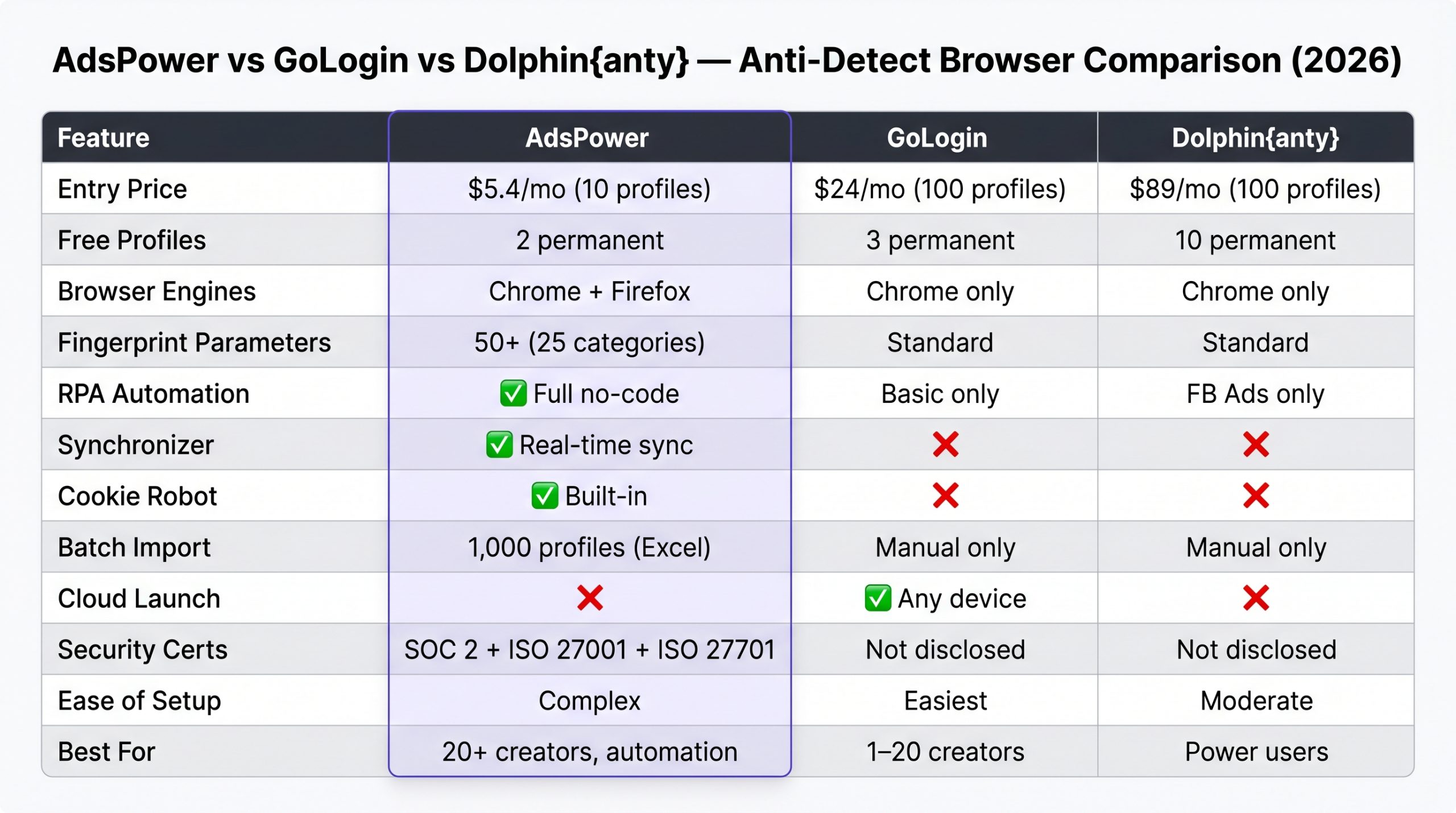
Dolphin{anty} vs GoLogin vs AdsPower (2026)
The Practical Stack Most Large Agencies Use
Dolphin{anty} for creator accounts · where the priority is team workflow, shift handovers, and account security. AdsPower for promotional ToF accounts · Reddit burners, Twitter promo accounts · where the priority is RPA automation and cost per profile. This two-tool approach uses each browser for what it does best.
Pricing: From 10 Free Profiles to Professional Scale
| Plan | Profiles | Monthly Cost | Best For |
|---|---|---|---|
| Free (permanent) | 10 | $0 | New agencies, testing, solo operators |
| Base | 100 | ~$89/mo | Growing agencies (10–20 creators) |
| Team | 300+ | Custom | Large agencies with multi-person teams |
The free 10-profile plan is genuinely useful · not a crippled trial. An agency managing up to 10 creators can operate entirely on the free plan indefinitely. The jump to the paid Base plan at ~$89/month is steep compared to GoLogin (~$24) and AdsPower ($5.4), which is Dolphin’s most significant competitive weakness. The workflow and team features justify the price for agencies where shift efficiency is a measurable operational metric · harder to justify for smaller solo operations.
- Best free tier · 10 profiles permanent
- Status/Tags/Notes dashboard · unmatched
- Smart Paste for human-like behavior
- Real-time cloud sync cross-timezone
- JSON/Netscape cookie import/export
- Bulk Extensions Manager
- Integrated proxy manager with IP checker
- Clean, modern UI · fast chatter onboarding
- Most expensive at 100+ profiles
- No RPA automation (only basic Scenarios)
- No Synchronizer
- RAM-heavy with many simultaneous profiles
- July 2024 security incident (resolved)
- Team seat pricing adds cost at scale
FAQ: Dolphin{anty} for OFM Agencies
Not comparable · they solve different problems. A VPN changes your IP address only. Dolphin{anty} changes your entire browser fingerprint · Canvas, WebGL, AudioContext, hardware ID, font enumeration · plus provides isolated cookie storage per profile. OnlyFans tracks fingerprint signals, not just IP. A VPN with Chrome is a partial solution at best. Dolphin with a residential proxy is a complete solution for multi-account management. You need both IP isolation (proxy) and fingerprint isolation (Dolphin). A VPN gives you neither of those adequately for multi-account OFM work.
Yes. MacBook Air M3 or M4 with 16GB unified memory runs 8–10 Dolphin profiles comfortably. With 8GB RAM, you’re limited to 2–3 profiles before performance degrades noticeably. For agency owners who need to review multiple accounts simultaneously, 16GB is the practical minimum. For individual chatters managing one creator account per session, 8GB is fine. If your chatters are on budget Windows laptops with 8GB RAM · which is common for VAs in the Philippines · configure shifts so each chatter works one account at a time rather than running multiple profiles simultaneously.
Add your VA as a team member in Dolphin’s Team Settings with User-level access. Share the specific creator profile with their account. When they open Dolphin and launch the profile, the browser session opens already logged into OnlyFans via stored cookies · they never see the username, password, or 2FA code. They can work the inbox for their entire shift and close Dolphin. The session state is preserved for the next chatter. Change your OnlyFans password from outside Dolphin immediately if you remove a chatter from your team.
Genuinely usable. The free plan includes all core features · fingerprint spoofing, proxy integration, team sharing, status/tags/notes, cloud sync, and cookie import/export. There’s no time limit, no watermark, no feature lockout. An agency managing up to 10 creators can run indefinitely on the free plan. The only meaningful limitation is profile count · once you exceed 10 creators, you need a paid plan. For new agencies or those still building their roster, the free plan is a legitimate starting point, not a bait-and-switch trial.
Not at the same depth. Dolphin has a “Scenarios” feature for basic automation · login flows, scrolling sequences, simple warm-up browsing. It also exposes an API for developers who want to integrate Selenium, Puppeteer, or Playwright for custom automation. What Dolphin doesn’t have is AdsPower’s no-code RPA drag-and-drop builder or the Synchronizer. For agencies that need to automate heavy ToF promotion across 50 Reddit accounts, AdsPower is the right tool for that layer. For the creator account management layer · where the priority is team workflow and account security · Dolphin’s Scenarios are sufficient.
Yes, with appropriate precautions. The July 2024 incident exposed session cookies for approximately 15% of users · not master passwords. Dolphin responded by implementing client-side encryption, meaning profile data is encrypted on your device before upload. Dolphin’s servers cannot read it. For OFM agencies: enable 2FA on all creator accounts via a separate authenticator app (not stored in Dolphin), use strong unique master passwords, and never store banking or payout credentials inside Dolphin profiles. With these precautions, the current security posture is acceptable for creator account management.
Browser Sorted. Now Train the Team.
Dolphin{anty} handles the session isolation. The next layer is hiring and training chatters who can use it to actually convert fans into revenue.
READ THE CHATTER HIRING GUIDE →
🔗 More in Anti-Detect Browsers