GoLogin for OnlyFans Management (2026): How to Run 50+ Accounts Without Getting Linked or Banned
 By The OFM Audit Team • 14 min read
Prefer to watch? We walk through the full GoLogin setup for OnlyFans multi-account management in this video:
- What GoLogin does: Creates completely isolated browser environments · each with its own unique fingerprint, IP, cookies, and hardware ID · so OnlyFans cannot link multiple creator accounts to the same operator.
- Best for: New-to-intermediate OFM agencies (1–20 creators). Cleanest UI in the anti-detect market. Cloud Launch feature allows emergency access from any device.
- vs Dolphin{anty}: GoLogin is easier to set up. Dolphin{anty} has more OFM-specific integrations and a stronger free tier (10 profiles vs GoLogin’s 3). Large agencies often prefer Dolphin. New operators prefer GoLogin.
- Critical requirement: GoLogin alone is not enough. You must pair it with Static Residential Proxies (one per creator account). Without residential IPs, GoLogin’s fingerprint isolation is meaningless.
- Pricing: Free (3 profiles) · Professional ~$24/mo (100 profiles) · Business ~$49/mo (300 profiles). 7-day free trial on all paid plans.
GoLogin · The “No-Headache” Multi-Account Browser
AdsPower is for technicians. Dolphin{anty} is for power users. GoLogin is for agency owners who need robust session isolation without spending 3 hours configuring WebRTC leak settings. The Orbita browser engine (Chromium fork) produces natural fingerprints that OnlyFans cannot distinguish from real users when paired with residential proxies.
TRY GOLOGIN FREE (7 DAYS) →You’re managing three creators on your laptop. Creator A is doing $8K/month. Creator B is at $3K and growing. Creator C just launched. You’re logging into all three from the same Chrome browser, maybe switching Google profiles between them.
That setup has an expiration date.
OnlyFans doesn’t just track your IP address. It tracks a combination of signals that create a unique “fingerprint” for each browser session · GPU rendering characteristics, installed fonts, screen resolution, audio processing signatures, and dozens of other hardware and software parameters. When those signals overlap between multiple creator accounts, the platform links them. If one account gets flagged for any reason, linked accounts can be swept in the same review.
Anti-detect browsers like GoLogin exist to solve this at the hardware signature level · not just the IP level. This guide explains exactly how, and how to configure GoLogin specifically for OnlyFans multi-account management.
Complete your stack: pair your antidetect browser with the right tunnel · see our OnlyFans VPN guide for the full setup.
Going further on account safety: our OnlySpoofer review covers geo-spoofing for US-targeted accounts.
Why Chrome + VPN Fails for Multi-Account OFM in 2026
The “just use different Chrome profiles” approach works for casual multi-account use on platforms with basic detection. OnlyFans, as of 2025–2026, has significantly hardened its session tracking. Here’s what Chrome profiles and VPNs don’t address.
The Fingerprinting Signals That Expose You
Your graphics card renders a hidden image differently from every other GPU. This rendering signature is consistent across sessions and browser profiles. Chrome profiles share the same GPU · so every account you manage on the same machine has an identical Canvas fingerprint.
Similar to Canvas but captures your GPU vendor, renderer string, and 3D rendering behavior. Again, identical across Chrome profiles on the same machine. A VPN changes your IP; it does nothing to your WebGL signature.
Your audio subsystem processes oscillator signals in a way that’s unique to your hardware and OS configuration. This is one of the hardest fingerprints to spoof and one of the most reliable for platform tracking.
Browsers can enumerate fonts installed on your system. The specific combination of fonts on your machine is surprisingly unique. Two Chrome profiles on the same laptop report identical font lists · creating a linkable signal.
The Shadow Profile Chain Ban
Here’s what the failure mode looks like in practice. An agency manages Creator A ($12K/month) and Creator B ($3K/month) from the same Chrome browser on the same machine, using a VPN. Creator B’s account gets flagged · perhaps a subscriber disputes a charge, or ToF promotion on Reddit generates a complaint.
OnlyFans reviews Creator B’s account. In the process, their system notes that Creator B’s session shares Canvas fingerprint, AudioContext signature, and font enumeration with Creator A’s sessions. Both accounts are linked to the same operator. Creator A is now under review by association.
This is called a Shadow Profile Chain Ban. The agency loses $12K/month of revenue because of a dispute on a $3K account. It could have been prevented by running each account in a fully isolated GoLogin profile with its own spoofed fingerprint.
How GoLogin Actually Solves This
GoLogin creates isolated browser profiles using its own Chromium fork called Orbita. Each GoLogin profile has a completely independent set of spoofed fingerprint parameters · a unique Canvas signature, unique WebGL parameters, unique AudioContext, unique font list, unique User Agent, unique screen resolution, and unique timezone.
When OnlyFans reads these signals from a GoLogin profile, it sees what appears to be a completely different device in a different location. There is no technical correlation between Profile A and Profile B · even if both are running simultaneously on the same laptop.
The key word is “appears.” For this illusion to hold up, the fingerprint must be internally consistent. A browser that claims to be Chrome 122 on a Windows 11 machine should produce Canvas signatures consistent with that hardware configuration. GoLogin’s Orbita engine generates consistent fingerprints by default · you don’t have to manually calibrate each parameter to ensure they don’t contradict each other. This is where GoLogin’s ease-of-use advantage over AdsPower is most tangible.
The Zero-Risk GoLogin Setup for OnlyFans (Step by Step)
Step 0: Get Your Residential Proxies First
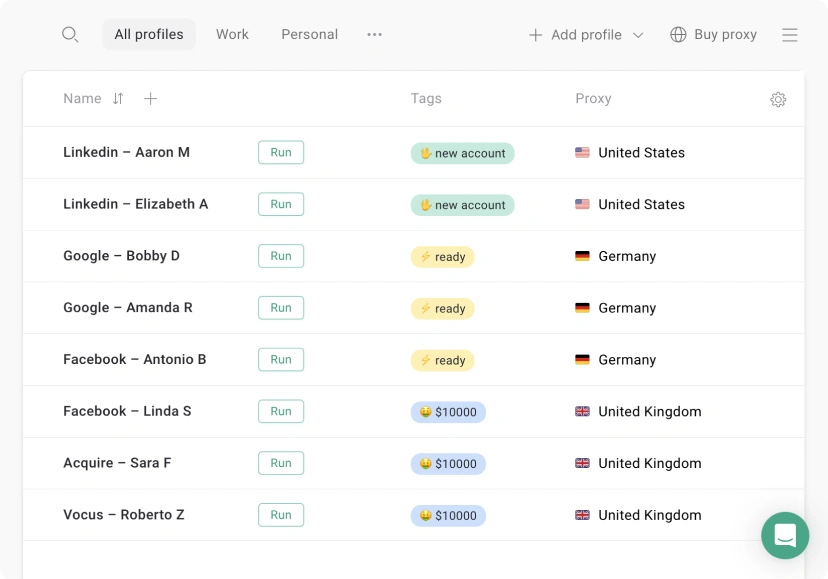
In your GoLogin dashboard, click “New Profile.” Name it after the creator. This will be the only browser environment used to access that creator’s OnlyFans account, social media accounts, and any associated platform.
In the profile settings, go to the Proxy tab. Enter your residential proxy credentials (IP, port, username, password) from NodeMaven or your provider. Select Static Residential · not rotating. Test the proxy to confirm it resolves to the correct location before proceeding.
GoLogin offers two fingerprint modes: Real (generates parameters consistent with the User Agent and OS you’ve selected) and Random (completely random values). Use Real. Random fingerprints can produce internally inconsistent combinations · a browser claiming to be Chrome on Mac with Windows-specific GPU parameters · which are detectable. Real mode produces coherent, believable fingerprints.
In Advanced Settings, set WebRTC to “Altered” · this makes the browser report the proxy IP as the WebRTC IP rather than leaking your real IP. If WebRTC is set to “Real” or “Disabled,” your actual IP may be exposed to the platform via WebRTC API calls.
Open the profile. Browse 3–5 legitimate websites for 5–10 minutes · news sites, YouTube, Google search. This establishes browsing history and cookie data that makes the profile look like a real human user rather than a freshly created bot environment. Only after warm-up should you log into OnlyFans for the first time on this profile.
Each creator’s GoLogin profile must only be used for that creator’s accounts. Do not log into Creator A’s TikTok from Creator B’s GoLogin profile. Do not copy cookies between profiles. The isolation is only effective if it’s absolute.
VA Management: Delegating Access Without Sharing Passwords
This is the feature that most directly addresses the biggest operational risk for OFM agencies: your chatter needs access to a creator’s OnlyFans inbox, but you don’t want to give them the master password or the 2FA code. GoLogin’s team collaboration feature solves this.
How Profile Sharing Works
In GoLogin, you create the profile (with the proxy, fingerprint, and initial session established). You then share that specific profile with a team member’s GoLogin account. When the team member launches the profile, they open the browser session in the state you left it · including all cookies, session tokens, and login states · without ever seeing the underlying credentials.
The chatter can use the OnlyFans inbox through GoLogin exactly as if they were the logged-in creator. They cannot export the session cookies to their own machine because GoLogin stores cookie data server-side and only decrypts it within the profile context. They cannot change account settings (password, payout details) without access to the 2FA code you’ve kept private.
Permission Levels
GoLogin’s team dashboard lets you assign permission levels: View Only (can see profile but not launch it), User (can launch and use but not edit fingerprint or proxy settings), and Manager (full access except billing). For chatters, the User level is appropriate · they can run the session and manage the inbox, but cannot modify the profile infrastructure or export any data.
GoLogin vs Dolphin{anty} vs AdsPower for OFM
| Feature | GoLogin | Dolphin{anty} | AdsPower |
|---|---|---|---|
| Ease of Setup | Easiest · guided UI | Moderate | Complex · NASA cockpit |
| Free Profiles | 3 forever | 10 forever | 2 forever |
| Paid Entry (100 profiles) | ~$24/mo | ~$89/mo | ~$9/mo |
| Cloud Launch (no install) | ✓ Yes | ✗ No | ✗ No |
| Android App | ✓ Yes | ✗ No | ✗ No |
| Fingerprint Quality | Very Good | Excellent | Good |
| VA Team Roles | ✓ Yes | ✓ Yes | ✓ Yes |
| API / Automation | Basic | Advanced | Advanced |
| Best For | New-mid agencies (1–20 creators) | Large agencies (20+ creators) | Budget, tech-savvy users |
The Honest Verdict on GoLogin vs Dolphin{anty}
Dolphin{anty} has a stronger free tier (10 profiles vs GoLogin’s 3), more advanced fingerprint customization, and deeper automation capabilities for agencies running mass outreach across ToF platforms. For agencies managing 20+ creator accounts with complex multi-platform workflows, Dolphin{anty} is the more powerful tool.
GoLogin wins on onboarding speed and the Cloud Launch feature. If you’re starting an agency and need something operational in 30 minutes rather than 3 hours, GoLogin is the correct starting point. You can migrate to Dolphin{anty} once your operation is large enough to justify the price and complexity jump.
Pricing and ROI Calculation
GoLogin’s pricing is straightforward. The main cost consideration for OFM agencies isn’t the browser subscription · it’s the proxy cost on top of it.
The ROI argument isn’t subtle. A $99/month infrastructure investment protects $25,000 in monthly revenue from a chain ban scenario. This is the “insurance premium” framing that correctly positions anti-detect browser costs · not as a software expense, but as the cheapest insurance policy available for your agency’s primary revenue asset.
- Easiest setup in the market
- Cloud Launch · access from any device
- Android app for mobile simulation
- Coherent “Real” fingerprint mode
- Clean VA team delegation
- 7-day free trial on paid plans
- Free proxies are datacenter · never use for OF
- Only 3 free profiles (Dolphin gives 10)
- More expensive than AdsPower at scale
- Less automation than Dolphin or AdsPower
- RAM-heavy when running many profiles simultaneously
FAQ: GoLogin for OnlyFans Management
Not when configured correctly. GoLogin’s Orbita browser is based on Chromium and presents itself as standard Chrome to any platform. OnlyFans cannot distinguish a well-configured GoLogin profile from a real user on a real device. The fingerprint parameters GoLogin generates are internally consistent and match real-world hardware configurations. The critical caveat: you must pair GoLogin with residential proxies (not GoLogin’s built-in datacenter proxies) and use the “Real” fingerprint mode. A poorly configured profile · using datacenter IPs, inconsistent fingerprint parameters, or a suspicious User Agent · can be detected regardless of which anti-detect browser you use.
Yes, absolutely. Each creator must have their own GoLogin profile with a unique fingerprint and a dedicated static residential proxy. Sharing a profile between two creator accounts defeats the purpose · they would share fingerprint parameters and IP, creating exactly the correlation you’re trying to prevent. The rule is: one profile per creator account, one dedicated static residential IP per profile, zero exceptions.
Always use “Real” mode. Random fingerprints generate parameters independently, which can produce internally inconsistent combinations · a browser reporting Chrome 120 on macOS Sonoma but with GPU parameters that don’t match any real Mac hardware configuration. These inconsistencies are detectable. “Real” mode generates a fingerprint set that corresponds to an actual hardware and software configuration, ensuring all parameters are mutually consistent. The fingerprint looks like a real device because it’s modeled on one.
Using an anti-detect browser itself is not explicitly prohibited in OnlyFans’ Terms of Service. What the ToS restricts is sharing account access, operating accounts on behalf of others without disclosure, and automated behavior that mimics platform manipulation. GoLogin is a tool for managing browser sessions · its use for legitimate OFM agency operations (where creators have signed contracts authorizing management access) falls into a legal gray area that most agencies navigate by maintaining clear contractual relationships with their creators. The anti-detect browser doesn’t make illegal activity legal; it makes legitimate multi-account management operationally safe from a platform security perspective.
No. A consumer VPN (NordVPN, Surfshark) inside GoLogin still routes through a datacenter IP. OnlyFans’ trust scoring system deprioritizes sessions from known datacenter ASNs regardless of how good the browser fingerprint is. Residential proxies · IP addresses assigned by real ISPs to real households · are the only IP type that maintains a high trust score on OnlyFans. The combination of GoLogin’s fingerprint isolation plus residential IP address is what creates the “real user on a real device at home” signal that the platform’s security systems treat as legitimate.
GoLogin stores profile data (fingerprint parameters, proxy configuration, cookies) on their servers. If you cancel, you lose access to stored profiles and their associated cookies. Active sessions on OnlyFans created through those profiles will remain logged in until they naturally expire, but you won’t be able to manage them through GoLogin. Before canceling, export all profile cookies and save proxy credentials. If migrating to Dolphin{anty}, you can import cookies to maintain session continuity on existing creator accounts.
Infrastructure Secure. Now Hire the Team.
GoLogin isolates the accounts. The next layer is hiring and training chatters who can actually use them to convert fans into revenue.
READ THE CHATTER HIRING GUIDE →
🔗 More in Anti-Detect Browsers